
Download Ryrob – Free AI Blog Title Generator, SEO‑Friendly Headlines
Overview
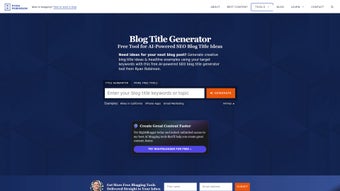
Ryrob Blog Title Generator is a free, AI‑powered tool built especially for bloggers, content marketers, and anyone who needs to craft click‑worthy headlines quickly. Leveraging OpenAI’s GPT‑3 technology, Ryrob scans the top‑ranking titles that appear in Google for any given keyword, then produces a curated list of fresh, SEO‑friendly title ideas. The interface is intentionally minimal: you type a keyword or short phrase, click “Generate Ideas,” and the engine returns dozens of suggestions across popular formats such as listicles, how‑to guides, and question‑based headlines.
Each suggestion can be copied to the clipboard with a single click, making it easy to paste directly into WordPress, Medium, or any other content management system. While Ryrob shines in speed and simplicity, it currently lacks deep customization options (like tone control or character limits) and does not yet support languages beyond English. Nonetheless, for anyone looking to boost organic traffic, improve click‑through rates, and break through writer’s block, Ryrob offers a secure, always‑online solution that requires no installation, no subscription, and no hidden fees.
The tool’s core promise is to turn a single keyword into a library of compelling titles that align with Google’s ranking patterns, thereby giving your blog a better chance of being discovered by the right audience.
Key Features & Benefits
- AI‑driven title generation using GPT‑3 for natural‑language creativity.
- Analysis of top‑ranking Google results to mimic proven headline structures.
- Multiple headline categories: listicles, how‑to, question, and more.
- One‑click copy to clipboard for seamless integration with any CMS.
- Free to use with no registration, ads, or hidden charges.
- Responsive web design works on desktop, tablet, and mobile browsers.
Why These Features Matter
The combination of AI and real‑world SERP analysis means Ryrob doesn’t just churn out generic titles; it learns from what Google already rewards. This translates into higher click‑through rates (CTR) because the suggested headlines follow patterns that users have already proven to click on. The variety of formats helps creators diversify their content strategy—mixing list‑based posts with instructional guides keeps a blog fresh and appealing to different reader preferences.
The one‑click copy function removes friction, allowing writers to stay in the flow without switching between tabs or opening separate tools. Because the service is entirely web‑based and free, there’s no barrier to entry for new bloggers or small teams operating on tight budgets. Finally, the responsive design ensures that you can generate titles on the go, whether you’re drafting a post from a coffee shop laptop or a smartphone while commuting.
Pros
- Fast, real‑time generation.
- Completely free with no hidden subscription.
- Intuitive UI—no learning curve.
- SEO‑aligned titles based on actual Google data.
- Works on any modern browser, no download required.
Cons
- No advanced customization (tone, length, keyword density).
- Lacks multi‑language support; English‑only.
- Cannot save title lists for future reference within the tool.
- Relies on internet connection; offline use not possible.
- Limited to title generation—no full‑post outlines or content.
Installation, Usage & Compatibility
Getting Started – No Installation Required
Because Ryrob is a cloud‑based web application, there is absolutely no software to download or install. Simply navigate to the Ryrob website using any up‑to‑date browser (Chrome, Firefox, Edge, Safari, or Opera). The page loads in seconds, and the tool is ready for immediate use. This zero‑install approach ensures that you can start generating titles from any computer, laptop, or mobile device without worrying about system permissions or administrator rights.
Step‑by‑Step Usage Guide
- Enter a primary keyword or short phrase in the input box (e.g., “remote work tips”).
- Choose a headline category if you prefer a specific style, or leave it on “All” for a mixed list.
- Click the Generate Ideas button.
- Wait a few seconds while the AI analyzes Google’s top results and produces 10‑20 title suggestions.
- Hover over any title and click the clipboard icon to copy it instantly.
- Paste the copied title into your blog editor, SEO plugin, or content calendar.
System Requirements & Operating System Support
Ryrob runs on any operating system that can launch a modern web browser—Windows 10/11, macOS Ventura and later, Linux distributions, Chrome OS, iOS, and Android. The only technical requirement is an active internet connection, as all processing occurs on Ryrob’s servers. For the best experience, we recommend using the latest version of Chrome, Firefox, or Safari, as these browsers fully support the JavaScript and Web‑GL features used by the AI interface. Users on older browsers may encounter slower load times or occasional layout glitches, but the core title generation functionality will still operate.
Keeping Your Data Secure
Ryrob uses HTTPS encryption for all data transmitted between your device and its servers, ensuring that the keywords you submit are protected from eavesdropping. The service does not store personal information or the generated titles beyond the session, meaning your brainstorming process remains private. Because the tool is free and does not require an account, there’s no risk of password leaks or data breaches tied to user profiles.
FAQ & Final Thoughts
Is Ryrob really free or are there hidden fees?
Ryrob is completely free to use. There are no subscription plans, premium tiers, or hidden charges. All features described on the site are available to anyone with an internet connection.
Can I generate titles in languages other than English?
Currently, Ryrob supports only English. The underlying GPT‑3 model can handle other languages, but the tool’s SEO analysis is tuned to English Google SERPs, so non‑English results may not be optimal.
Do I need to create an account to save my title ideas?
No account is required. Ryrob does not store your generated titles after you close the browser tab. If you need to keep a list, copy the titles to a document or note‑taking app before leaving the page.
How does Ryrob ensure the titles are SEO‑friendly?
Ryrob scans the top‑ranking Google results for the entered keyword, extracts common phrasing patterns, and then prompts GPT‑3 to create new titles that mirror those successful structures. This data‑driven approach aligns your headlines with what Google currently favors.
Is there a limit to how many titles I can generate per day?
There is no strict daily cap, but extremely high usage may trigger a temporary rate limit to protect the service. For typical blogging needs, you can generate dozens of titles without any interruption.
Conclusion – Take the First Step to Better Headlines
If you’ve ever stared at a blank screen, wondering how to craft a headline that both ranks and resonates, Ryrob offers a practical, no‑cost solution. By merging GPT‑3’s creative language abilities with real‑world SEO data, the tool gives you a steady stream of title options that are ready to copy, paste, and publish. While it doesn’t replace a full‑featured content planner, it eliminates the most time‑consuming part of the writing process—brainstorming the perfect headline. For bloggers, freelancers, and small marketing teams looking to boost organic traffic without adding new software to their stack, Ryrob is a smart addition to the workflow. Visit the Ryrob website today, type in your keyword, and watch the AI generate a list of click‑magnet titles that can help your posts climb the rankings.
Ready to upgrade your blog’s visibility? Download Ryrob now and start generating SEO‑friendly headlines for free—no registration, no hassle.



.png)



